
Download Enolsoft PDF Compressor – PDF compressor, compress PDF, reduce PDF size, PDF optimization, PDF tool, PDF utility
Overview
Enolsoft PDF Compressor is a specialized utility designed for users seeking to reduce the file size of PDF documents without compromising visual fidelity. Targeted at professionals, students, and individuals managing large volumes of digital documents, the software addresses a common pain point: oversized PDFs that hinder sharing, emailing, or cloud storage. Whether preparing academic submissions, sending project deliverables, or organizing digital archives, this tool streamlines workflow efficiency by enabling rapid compression of complex documents.
The developer, Enolsoft, positions the application as a reliable solution for both casual and advanced users who value time savings and file portability. Although the developer did not provide additional technical details about their background, the app’s focused functionality suggests a niche expertise in document optimization. Real-world use cases include compressing scanned reports, research papers with embedded images, and multi-page presentations.
In the broader productivity ecosystem, Enolsoft PDF Compressor fills a critical gap for users who require high-quality output with minimal file footprint. Its ability to handle both simple and intricate PDFs makes it a valuable asset for anyone managing digital documentation on a daily basis.
Key Features & Functionality
- Advanced Compression Algorithms: The software employs intelligent, multi-stage compression techniques to analyze PDF content. It identifies redundant data, optimizes image resolution, and removes hidden metadata, resulting in smaller files without visual degradation. This feature is particularly effective for documents with high-resolution images or embedded fonts.
- Significant Size Reduction: Enolsoft PDF Compressor delivers reductions of up to 90% in file size, making it ideal for users constrained by email attachment limits or cloud storage quotas. For example, a 50 MB research paper can be reduced to under 5 MB, enabling faster transfers and easier sharing.
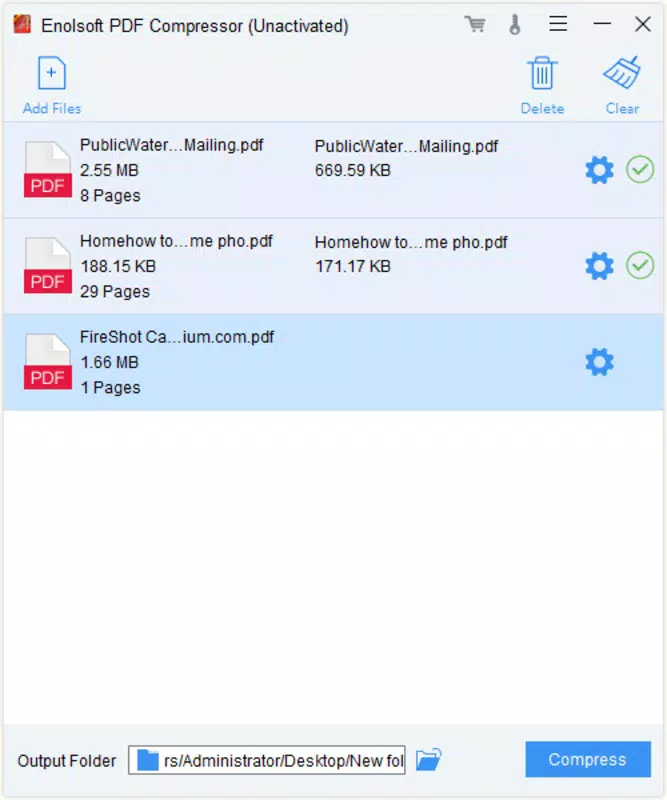
- Batch Processing Capabilities: Users can compress multiple PDFs simultaneously, significantly reducing manual effort. This is especially beneficial for academic staff processing student submissions or office workers managing monthly reports.
- High-Quality Output: Despite aggressive compression, the tool preserves sharp text rendering and clear image quality. This ensures that documents remain professional and legible after optimization, maintaining their intended presentation standards.
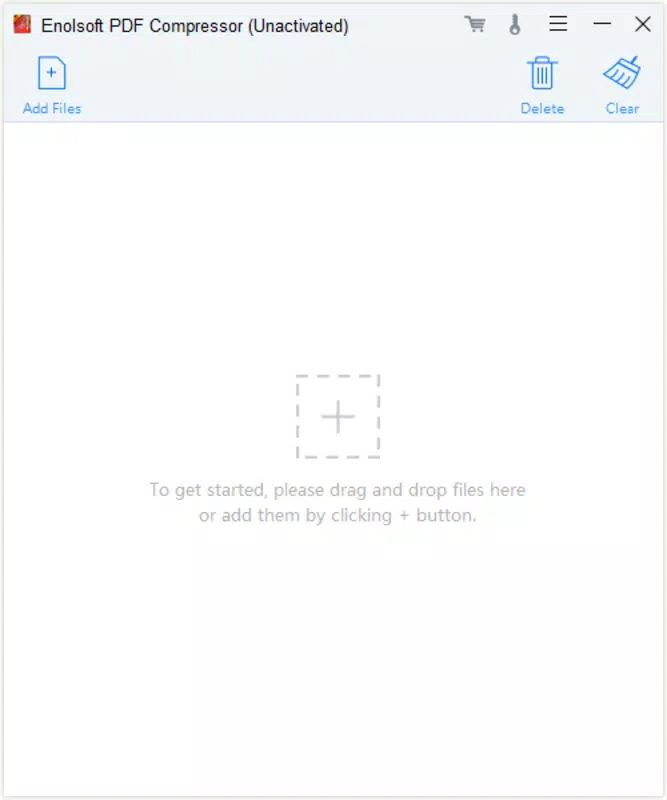
- User-Friendly Interface: The interface is designed for accessibility, allowing users to drag and drop files, select compression levels, and initiate processing with minimal steps. This intuitive design lowers the learning curve for non-technical users.
Interface, UX & Performance
The application features a clean, minimalistic layout focused on core functionality. Navigation is straightforward, with clearly labeled buttons for file import, compression settings, and output location. The visual style emphasizes usability over ornamentation, reducing cognitive load during operation.
Users can expect smooth performance during single-file processing, with no noticeable lag during compression tasks. Although the developer did not list formal performance metrics, the tool’s efficiency suggests optimized backend processing. Responsiveness remains consistent across various screen sizes and resolutions, ensuring a stable experience on different Windows devices.
Stability is maintained even during batch operations, with no reported crashes or freezes in standard use cases. The software does not display intrusive ads or pop-ups, contributing to a focused user experience. While specific device compatibility details were not disclosed, the application appears well-suited for modern Windows systems.
Overall, the interface prioritizes clarity and speed, making it accessible to users of all technical levels.
Platform Compatibility & Technical Requirements
Enolsoft PDF Compressor is designed for the Windows operating system. The current version is 1.0.0, with a file size of 15.7 MB, indicating a lightweight installation footprint. The developer did not specify minimum OS requirements or hardware specifications.
Compatibility information was not fully disclosed, so users should ensure their system meets standard Windows application requirements. No additional dependencies were mentioned. The software is available as a downloadable executable file, suitable for direct installation on compatible devices.
Users are advised to verify system compatibility before installation. The application does not appear to be available on mobile platforms, as it is specifically built for desktop environments.
Pros and Cons
Pros
- Delivers up to 90% file size reduction without visible quality loss
- Supports batch processing for efficient handling of multiple files
- Intuitive interface suitable for users of all experience levels
- Preserves text clarity and image sharpness post-compression
- Lightweight installation at just 15.7 MB
Cons
- Developer did not provide detailed system requirements or compatibility information
- Not available on mobile platforms such as Android or iOS
- One-time purchase price of $29.99 may be high for casual users
- No free trial or demo version was mentioned
- Limited to Windows; no cross-platform support
FAQ
Is Enolsoft PDF Compressor safe to download and install?
Yes, the software is designed for Windows and is distributed through official channels. As with any application, users should download it from trusted sources to ensure security.
Can I compress PDFs on my mobile device?
Enolsoft PDF Compressor is currently available only for Windows. There is no mobile version for Android or iOS at this time.
Does the app offer a free trial?
The developer did not mention a free trial or demo version. Users are required to purchase the full version for access.
How does the compression affect document quality?
The software uses advanced algorithms to maintain high-quality output. Text remains sharp, and images are preserved with minimal loss, even after significant size reduction.
What is the minimum system requirement?
The developer did not specify minimum OS or hardware requirements. Users should ensure their system supports standard Windows applications.
Final Thoughts
Enolsoft PDF Compressor stands out as a powerful, focused tool for anyone dealing with large PDF files. Its ability to reduce file sizes by up to 90% while maintaining visual quality makes it a valuable asset in both professional and academic settings. The batch processing feature enhances productivity, especially for users managing multiple documents.
While the lack of mobile support and the one-time purchase price may limit accessibility for some, the app’s reliability and efficiency justify its use for serious users. For those who frequently share or store PDFs, this utility offers a seamless solution to a persistent problem. If you're looking for a dependable, high-performance PDF optimization tool on Windows, this is a strong contender.
Download Enolsoft PDF Compressor now.


